Live monitoring matters because a warning only helps if it reaches you while there is still time to act. BeAware watches the addresses you save, checks federal emergency and weather alerts every 2 minutes, and speaks up when something near those places changes. That gives you time to prepare instead of react.
Too often, people hear about a local emergency after the moment to use the warning has passed. Monitoring closes that gap for the places you care about most.
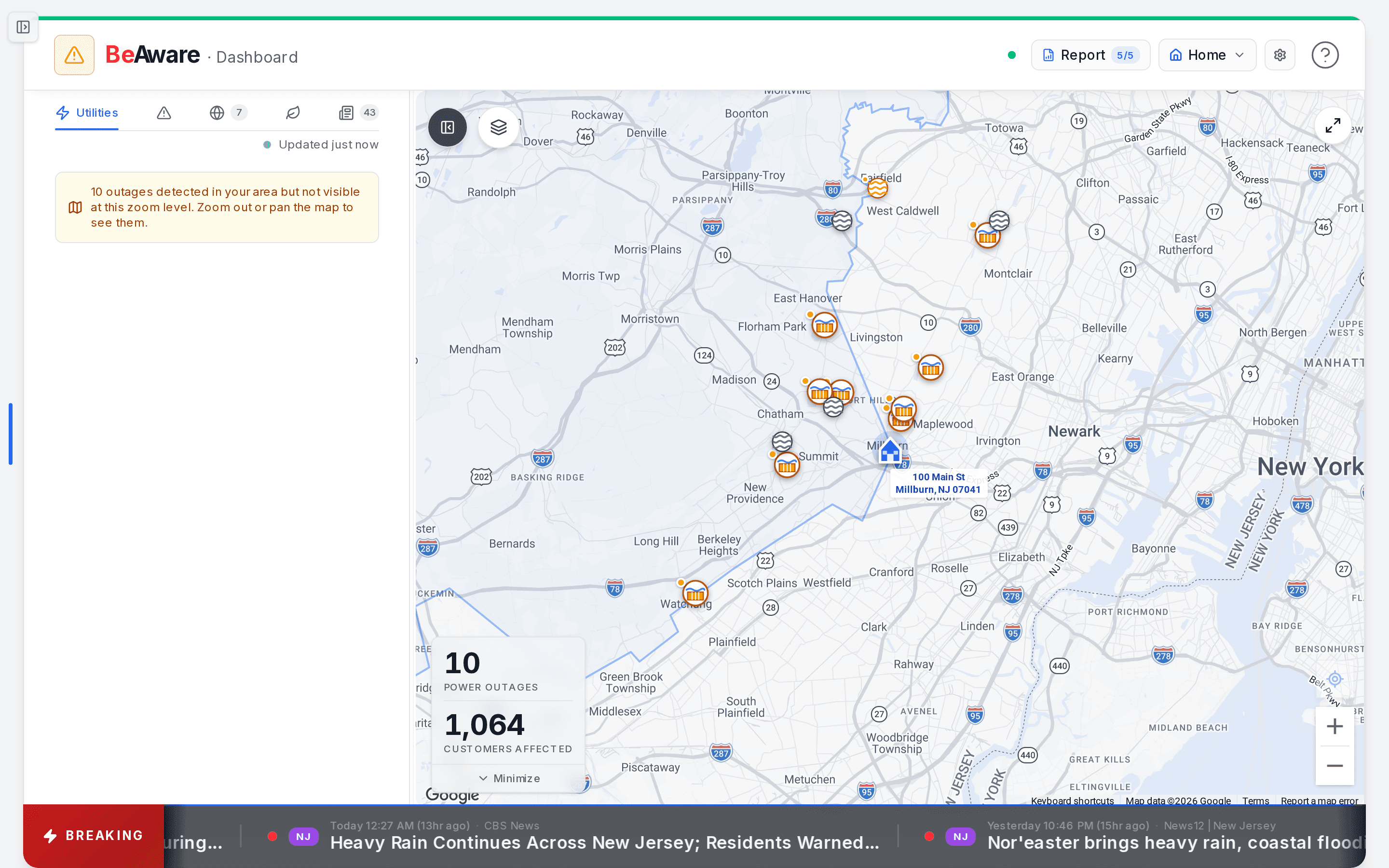
- Open this address's full risk report. The count is how many fresh reports you have left this month.
- The address you are watching. Tap to switch saved locations or add a new one.
- Pick what you are watching: outages, emergency, digital, environment, or news. The number is how many.
- The ticker: breaking local alerts and headlines for this address, scrolling along the bottom.
What does BeAware actually watch?
Six kinds of live information, checked continuously:
- Federal emergency alerts from FEMA's Integrated Public Alert & Warning System (IPAWS)
- Weather watches and warnings from the National Weather Service
- Utility outages reported by the utilities serving your address
- Wildfire perimeters for active fires
- Digital infrastructure such as internet providers, wireless carriers, and cloud services
- Air and water conditions: air quality and nearby river gauges
Emergency and weather alerts are checked every 2 minutes. Digital services are checked every 5 minutes. Across live monitoring and the baseline report, BeAware draws on 20+ data sources.
Alerts are matched to each address you save. When an alert comes with a mapped area, you are included if your address falls inside it. When it covers whole counties instead, any saved address in those counties counts.
Watching more than one address
Add the places you want watched: your home, a parent's house, a second property. Each one is monitored on its own, with its own status and its own baseline report.
How many you can add depends on your plan. A BeAware plan watches one address. The combined BeAware + BeReady plan watches up to three. See the plans to compare.
Switch between addresses from the location button at the top of the monitoring dashboard. Emergency alert emails name the saved place they are near, such as "near Home," so you know at once which one is affected.
How quickly will I hear about something?
Extreme emergency alerts go out with no waiting period. Less urgent ones follow a short hold of about 5 to 15 minutes, and some changes appear only on your dashboard. Here is the detail.
- Extreme emergency alerts are emailed on the first pass. If you verify your phone, they can also arrive by text or WhatsApp.
- Severe alerts pause for roughly 5 minutes. Moderate ones pause for roughly 15. That pause lets related warnings travel together in a single email.
- Air quality, river, and wildfire readings send an email when one reaches the level you chose, and again if it climbs higher.
- Utility and digital outages show on your dashboard right away, but they don't trigger email or texts yet.
In Alert Settings you choose the urgency level, add texts, and set quiet hours. Routine changes then stay quiet, while a real emergency still gets through. Texts are reserved for Extreme alerts.
An alert email tells you what is happening and which of your saved addresses it is near. It adds any instructions from the issuing agency and how long the alert stays in effect. A View live conditions button opens your dashboard. For outages, the dashboard card shows your utility's estimated restoration time.
Statuses and readings, side by side
Each address shows a single status on the dashboard, so you can read it in a second:
- All Clear: no active outages or severe alerts near you. Nothing needs you.
- Moderate: worth a look, for example when a Severe alert is active in your area.
- Elevated: the highest level, for example during an Extreme alert for your area.
Outages and network disruptions can also raise the status. The dashboard guide lists exactly what moves each level.
Air, rivers, and wildfire use their own four-step scale, and these are the levels you can choose for environmental alert emails:
| Reading | Air quality (AQI) | Wildfire | Nearby rivers |
|---|---|---|---|
| Normal | 0 to 50 | No active fire within 25 miles | Below action stage |
| Above Normal | 51 to 100 | Within 25 miles | At action stage |
| Caution | 101 to 150 | Within 10 miles | At flood stage |
| Danger | 151 or higher | Within 5 miles | At moderate or major flood stage |
The app describes them plainly. Above Normal is "worth knowing." Caution means it is "prudent to take simple precautions." Danger means "take protective action." Unless you change it, you get an email from Caution upward. River gauges without official flood stages always read Normal, since they have no stage to compare with.
River cards on the dashboard grade more cautiously than the email table. A river at flood stage already shows Danger there.
What should I do when a reading changes?
Match your response to the level: get ready at Caution, follow your plan at Danger, and restock once it clears.
- Caution: charge phones and battery packs, fill a few water containers, top off the car, and skim your plan so the first day is fresh in your mind.
- Danger: follow your plan. Monitoring already bought you the head start, and the plan tells you the steps.
- All clear: note anything that ran low so you can restock before the next one.
Two examples show how little time this takes. A family near the foothills checks the dashboard for about ten seconds each morning through fire season, then forgets about it the rest of the year. Setting "Wildfire near you" to Above Normal means they also get an email when a fire comes within 25 miles. For the steps that follow, see our wildfire preparedness guide.
A caregiver keeps a parent's address two states away on a BeAware + BeReady plan. When a storm watch is issued there, they see it first and call ahead while the power is still on.
History and live monitoring are different jobs
Your baseline report tells you what an address has faced over the years. Live monitoring tells you what is changing today. The two stay separate, so years of history are never mistaken for today's alarm.
Monitoring is the trigger, and your plan is the response. An alert tells you something is changing, and your BeReady plan tells you what to do about it.