To run a BeReady drill, open the drill library, pick one of the two drills suggested for your household, and read its script aloud with everyone at the kitchen table. It takes about 25 minutes and needs no special equipment. When you finish, click Mark this drill as run so the run is recorded for your household.
A drill is a conversation, not a test. You read one scenario aloud and talk through what your household would actually do. Nothing gets moved and nothing gets graded. Twenty-five minutes later, you know your plan a little better than you did before.
Opening the drill library
Open BeReady > Drill, or go straight to your drill library.
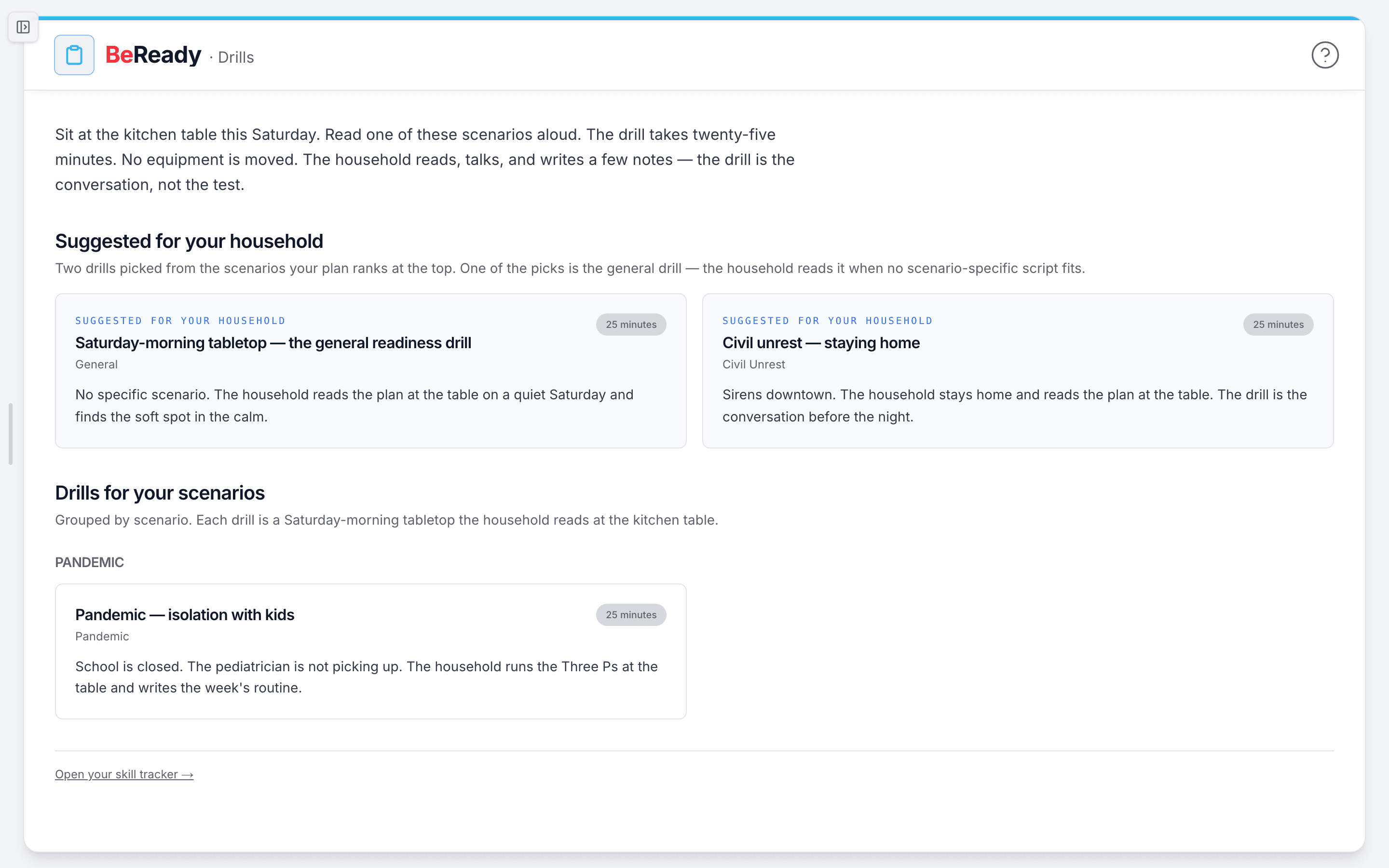
At the top, Suggested for your household shows two drill cards. Each card shows the drill title, the scenario it covers, a one-line summary and a 25 minutes chip. If your household has run it before, the card also shows "Last run" with the date. Click a card to open the full drill.
Below the suggestions, Drills for your scenarios lists every drill that matches a scenario on your plan, grouped by scenario. Browse it whenever you want something other than the two picks.
How does BeReady pick the two suggested drills?
The two suggestions come from the top two scenarios listed in your most recent plan, one drill for each. That's the order you picked scenarios in the plan wizard. Three rules shape the picks:
- Age. A drill is skipped if its minimum age is above your youngest household member. Two drills are written for ages 12 and up.
- Not yet run. Within a scenario, the picker prefers drills your household hasn't run yet.
- A general fallback. When no scenario-specific drill fits a slot, the general Saturday-morning tabletop fills it. A caption under the heading says so.
The library has 11 drills today:
| Drill | Scenario | Ages |
|---|---|---|
| Saturday-morning tabletop — the general readiness drill | General | All |
| Flood — evacuate or shelter | Severe weather | All |
| Hurricane Day Three pivot | Severe weather | All |
| Wildfire go-bag walkthrough | Severe weather | All |
| Winter storm — power out for seventy-two hours | Severe weather | All |
| Grid-down week one | EMP | All |
| Cyberattack — cash and comms | Cyberattack | All |
| Financial squeeze — the ninety-day pantry | Financial collapse | All |
| Pandemic — isolation with kids | Pandemic | All |
| Civil unrest — staying home | Civil unrest | 12 and up |
| Shelter-in-place — fallout posture | Nuclear | 12 and up |
Severe weather has four drills, so a severe-weather household gets a fresh pick each time it marks one as run, until all four are done. Those picks follow alphabetical order, not the specific hazards you chose, so a winter-storm household may want to open the winter-storm drill from the library. Most other scenarios have one drill. For those, the same drill stays suggested after you've run it, and the card shows the last-run date.
Running it at the table
- Open the drill. The page shows 25 minutes and the drill's summary. Above the script is the one framework concept it's anchored on. The info button beside it opens a short definition, a book excerpt and the full framework page.
- Follow the five parts. Every script runs Setup, Read this aloud, Three Ps walk-through, Decision points and Debrief. Setup tells you what to bring, such as the printed plan or an everyday item you already own. Nothing gets switched on or moved; the drill is reading and talking.
- Talk, and jot a few notes as you go. The decision points are there to start conversations. What matters is what your household says, not how fast you finish.
- Mark it as run. Scroll to When the household has read this through and click Mark this drill as run. The button briefly shows "Recording…", then you'll see "Drill recorded. Your plan saw it." and the last-run date.
A run counts once per household, not once per person. Marking the same drill again later updates its last-run date.
If the drill covers a hazard you want background on first, the hazard guides help. Try the winter storm guide, the hurricane guide, the wildfire guide or the flood guide.
Why does my drill say "Recording paused"?
"Recording paused. The drill counts when the tracker is on." means recording is switched off on our side for the moment, so this run wasn't saved. Nothing is wrong with your account, and there's no setting for you to change. Mark the drill again later, once recording is back on.
Where do my drill runs show up?
Your runs show as "Last run" with the date on the drill's card and on the drill's own page. They're saved to the same household record the Skills Tracker uses. The Skills Tracker page itself lists kits and foundation skills, not drill runs.
Drills before your first plan
The page shows "You don't have a plan yet. The drills come after the plan." with a Start your plan button. Next to it, Read the general tabletop opens the general drill, so you can try one before you commit. The two suggestions and the scenario library appear once your plan exists.
A Saturday morning, two ways
A family with severe weather on their plan opens the library on a Saturday morning. They pick "Winter storm — power out for seventy-two hours" from the severe-weather group and read it aloud over coffee. They settle where the flashlights live and who calls Grandma, then mark it as run. They're done before the kids finish breakfast.
A household that just finished its plan but still feels unsure starts with the general tabletop. They talk through the basics once, then come back the next month for a scenario-specific drill.
Drills are the practice step: they turn a written BeReady plan into something your household has said out loud. If you share drill completions with another household in My Tribe, a co-practice suggestion shows up on the card you share. See sharing with My Tribe.